When working with Exadata, there are several ways to create snapshot PDB clones. The main options are:
- Sparse Clone
- Exascale PDB Clone
- ACFS Snapshot Clone
Each one works well, but the best choice really depends on your environment and what you need.
Exascale Clone
This is clearly the most modern solution.
It’s fast, simple, and designed for large environments. But in reality, not everyone can use it yet because:
- It requires Exascale Vault storage
- You need Oracle 26ai or newer
So for many teams, this is not an option (at least for now).
Sparse Clone
Sparse clone is a classic solution. Many people already use it in 19c.
It works well, but:
- You need a sparse diskgroup
- Keeping the Test Master up to date takes some effort
ACFS Snapshot Clone
- Very fast
- Easy to use once set up
- for test environments
But:
- You need to manage ACFS
- No Smart Scan (except Flash Cache)
ACFS Clone Architecture
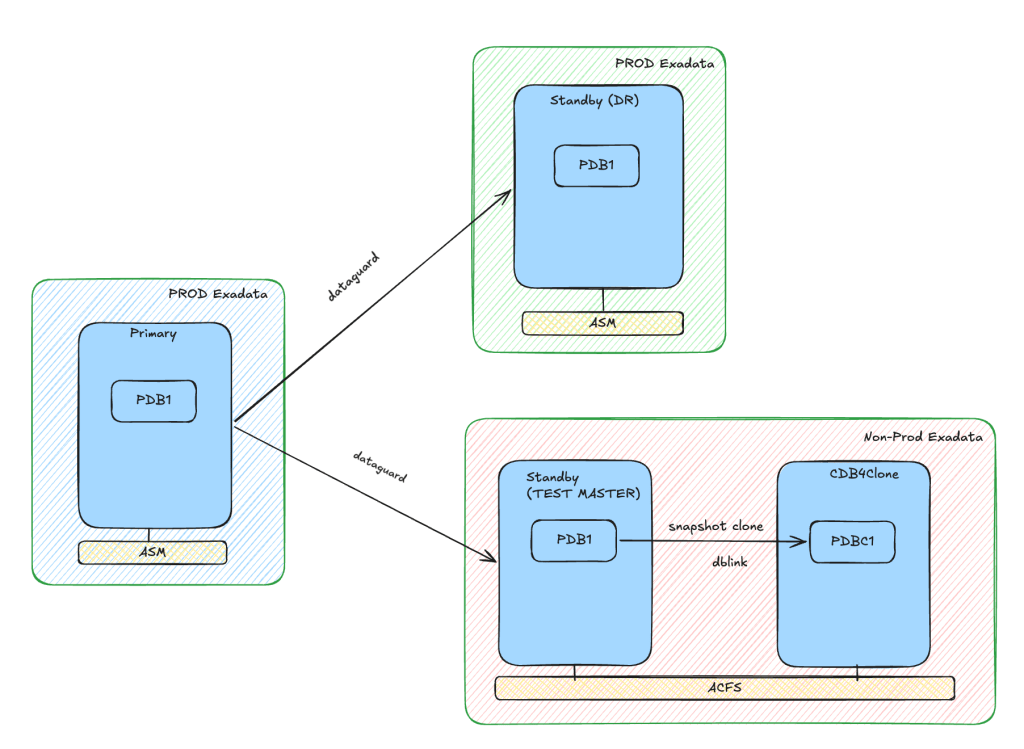
Here is the idea behind this setup:
- Production databases (Primary + Standby) stay on ASM
- The Standby (Test Master) is placed on ACFS
- A separate CDB (CDB4Clone) is used only for cloning
- A database link connects CDB4Clone to the Test Master
- Both use the same ACFS file system
Why do this?
Because it lets you create clones from the standby without touching production.
This is safer and usually faster.
Step-by-Step
1. Stop Redo Apply
Disable redo apply to get a consistent clone:
DGMGRL> edit database TMASTER set state=apply-off;
Succeeded.
2. Create the Snapshot PDB
SQL> create pluggable database PDBCL1
from PDB1@clone_dblink
snapshot copy
keystore identified by "xxxxx"
parallel 4;

Pluggable database created.

SQL> alter pluggable database PDBCL1 open instances=all;

SQL> show pdbs
    CON_ID CON_NAME                       OPEN MODE  RESTRICTED
---------- ------------------------------ ---------- ----------
         2 PDB$SEED                       READ ONLY  NO
         3 PDBCL1                         READ WRITE NO
3. Start Redo Apply Again
DGMGRL> edit database TMASTER set state=apply-on;
Succeeded.
4. Verify the Clone
Switch to the new PDB:
SQL> alter session set container = PDBCL1;
Session altered.

SQL> select NAME from v$datafile;
NAME
-------------------------------------------------------------------------------------------------------------------------------------------------------------------------------------------------------------------
	/oradata/acfsvolum1/CDB4CLONE/CDB4CLONE/4E7AAE459B30D527E063575319ABDADF/datafile/o1_mf_system_nwwsorhg_.dbf
	/oradata/acfsvolum1/CDB4CLONE/CDB4CLONE/4E7AAE459B30D527E063575319ABDADF/datafile/o1_mf_sysaux_nwwsorhr_.dbf
	/oradata/acfsvolum1/CDB4CLONE/CDB4CLONE/4E7AAE459B30D527E063575319ABDADF/datafile/o1_mf_undotbs1_nwwsorht_.dbf
	/oradata/acfsvolum1/CDB4CLONE/CDB4CLONE/4E7AAE459B30D527E063575319ABDADF/datafile/o1_mf_undo_2_nwwsorhw_.dbf
	/oradata/acfsvolum1/CDB4CLONE/CDB4CLONE/4E7AAE459B30D527E063575319ABDADF/datafile/o1_mf_users_nwwsorhy_.dbf
How ACFS Snapshot Works
ACFS uses a copy-on-write snapshot mechanism. When a snapshot is created:
A hidden directory (/.ACFS/snaps/) is generated:
#ll /oradata/acfsvolum1/CDB4CLONE/CDB4CLONE/4E7AAE459B30D527E063575319ABDADF/datafile/
	total 1056892
	drwxr-x---. 2 oracle asmadmin      20480 Apr  2 14:53 .
	drwxr-x---. 3 oracle asmadmin      20480 Apr  2 14:53 ..
	lrwxrwxrwx. 1 oracle asmadmin        117 Apr  2 14:53 o1_mf_sysaux_nwwsorhr_.dbf -> /oradata/acfsvolum1/.ACFS/snaps/4E7AAE459B30D527E063575319ABDADF/datafile/sysaux.281.1222425063
	lrwxrwxrwx. 1 oracle asmadmin        117 Apr  2 14:53 o1_mf_system_nwwsorhg_.dbf -> /oradata/acfsvolum1/.ACFS/snaps/4E7AAE459B30D527E063575319ABDADF/datafile/system.269.1222425061
	-rw-r-----. 1 oracle asmadmin 1073750016 Apr  2 14:54 o1_mf_temp_nwwsorhv_.dbf
	lrwxrwxrwx. 1 oracle asmadmin        117 Apr  2 14:53 o1_mf_undo_2_nwwsorhw_.dbf -> /oradata/acfsvolum1/.ACFS/snaps/4E7AAE459B30D527E063575319ABDADF/datafile/undo_2.287.1222425063
	lrwxrwxrwx. 1 oracle asmadmin        119 Apr  2 14:53 o1_mf_undotbs1_nwwsorht_.dbf -> /oradata/acfsvolum1/.ACFS/snaps/4E7AAE459B30D527E063575319ABDADF/datafile/undotbs1.293.1222425063
	lrwxrwxrwx. 1 oracle asmadmin        116 Apr  2 14:53 o1_mf_users_nwwsorhy_.dbf -> /oradata/acfsvolum1/.ACFS/snaps/4E7AAE459B30D527E063575319ABDADF/datafile/users.288.1222425065
Inside this folder:
- Your cloned PDB files are stored as links
- They point to the original data
- Only changes use extra space
TEMP files are the only ones really created separately. In my test, the new PDB used only about 2.7 MB.
# acfsutil snap info /oradata/acfsvolum1
	snapshot name:               4E7AAE459B30D527E063575319ABDADF
	snapshot location:           /oradata/acfsvolum1/.ACFS/snaps/4E7AAE459B30D527E063575319ABDADF
	RO snapshot or RW snapshot:  RW
	parent name:                 TMASTER
	snapshot creation time:      Thu Apr  2 14:53:12 2026
	file entry table allocation: 393216   ( 384.00 KB )
	storage added to snapshot:   2842624   (   2.71 MB )
Things to Keep in Mind
A few important points (based on real usage):
- No Smart Scan → queries can be slower
- Too many clone layers → performance can drop
- You need to manage ACFS carefully
So this is not ideal for heavy production workloads.
Reference
Oracle ACFS Snapshot Use Cases on Exadata (Doc ID KB121334)
 Oracle DBA Insights