If you recently moved from Oracle 19c to Oracle 23ai, you might find your file replication has stopped. Your status shows “Stopped”, and no matter how many times you try to start it, nothing happens.
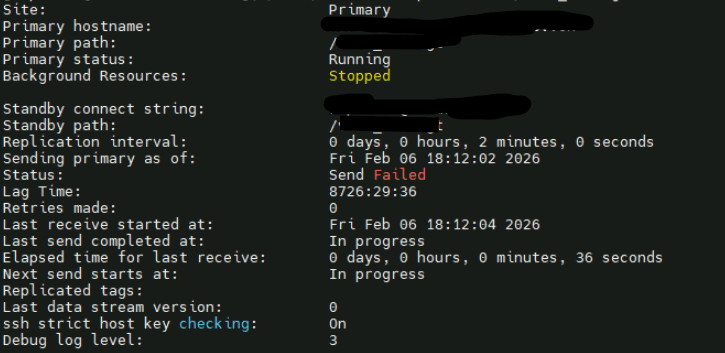
The Problem: The “SCAN” Name
In the old version (19c), replication usually connected directly to a specific server’s name or VIP. In Oracle 23ai, Oracle tries to be “smart” and automatically changes your connection to use the SCAN name (the cluster name).
SSH usually doesn’t work with SCAN names. It wants a real server name. This causes an error in the background, and the replication just gives up.
I:2026-02-06 19:37:11.665045 :    DUPD:140162860766016: [69689]:0019:uscgGetError:1229: Could not translate error code 0xff (255)
I:2026-02-06 19:37:11.665067 :    DUPD:140162860766016: [69689]:0020:uscgRunCmd:3749: Error: cmd=/usr/bin/ssh -o BatchMode=true  -o Ciphers=aes128-ctr  -o ConnectTimeout=3   -x repluser@mycluster-scan '/sbin/acfsutil snap dup apply -R -O VerifyStandby  /acfs_share_disk', ret=255
I:cmdOut=N/A
I:2026-02-06 19:37:11.665074 :    DUPD:140162860766016: [69689]:0021:uscgSshCmd:4019: Error: cmd=/sbin/acfsutil snap dup apply -R -O VerifyStandby  /acfs_share_disk, ret=255
I:cmdOut=N/A
I:2026-02-06 19:37:11.665079 :    DUPD:140162860766016: [69689]:0022:uscgRunCmdRemote:8540: Error: cmd=/sbin/acfsutil snap dup apply -R -O VerifyStandby  /acfs_share_disk, ret=255
I:cmdOut=N/A
I:2026-02-06 19:37:11.665082 :    DUPD:140162860766016: [69689]:0023:ERROR: uscgVerifyStandbyV2:7255: Unknown apply error (255)
I:2026-02-06 19:37:11.665086 :    DUPD:140162860766016: [69689]:0024:usrcPortMain:3279: initial standby verification check failed (255).
S:2026-02-06 19:37:11.665089 :    DUPD:140162860766016: [69689]:0025:ERROR: usrcPortMain:3297: SSH config problem. Shutdown relocate )
I:2026-02-06 19:37:11.705109 :    DUPD:140162860766016: [69689]:0026:usrcPortMain:3387: Returning with status 255.
S:2026-02-06 19:37:11.705121 :    DUPD:140162860766016: [69689]:0027:usrcTerm:3918: cleaning up
$ ssh replicuser@hexachp1-scan
ssh: connect to host mycluster-scan port 22: Connection refused
The “Stuck” Error (ACFS-10581)
When you try to fix the name back to a real server using the update command, you get hit with error ACFS-10581.
This happens because Oracle tries to talk to the old (broken) SCAN name one last time before letting you change it. Since the SCAN doesn’t answer, the command gets stuck in a loop and fails.
$ /sbin/acfsutil repl update -m replicuser@myhost-vip /acfs_share_disk
acfsutil repl update: ACFS-10581: Internal API error : [Command '/usr/bin/ssh -o Ciphers=aes128-ctr -o BatchMode=true    -x  replicuser@mycluster-scan "/bin/sh -c 'true'" 2>&1' failed with output 'ssh: connect to host mycluster-scan port 22: Connection refused
' -- retrying].
The Simple Fix: “Trick” the System
You don’t need to delete and recreate your replication. You just need to trick the primary server into thinking the SCAN name is working for 5 minutes.
On your Primary server, open the /etc/hosts file as root. Add a line that points the SCAN name to a real, working IP address of your standby server.
# Add this line temporarily10.11.xx.xx mycluster-scan
Now that the server “thinks” the SCAN name is a real working IP, run the start command:
acfsutil repl bg start /acfs_share_disk
Check your status (acfsutil repl info). It should now say “Active”!
[replicuser@primarynode02vm1 ~]$ /sbin/acfsutil repl info -c /acfs_share_disk
Site:                                Primary
Primary hostname:                    primarynode02vm1.vdad1.bcv.ch
Primary path:                        /acfs_share_disk
Primary status:                      Running
Background Resources:                Active

Standby connect string:              replicuser@mycluster-scan
Standby path:                        /acfs_share_disk
Replication interval:                0 days, 0 hours, 2 minutes, 0 seconds
Sending primary as of:               Sun Feb 08 09:56:15 2026
Status:                              Unknown
Lag Time:                            8726:30:16
Retries made:                        0
Last send started at:                Sun Feb 08 09:56:16 2026
Last send completed at:              Sun Feb 08 09:56:22 2026
Elapsed time for last send:          0 days, 0 hours, 0 minutes, 6 seconds
Replicated tags:
Last data stream version:            0
ssh strict host key checking:        On
Debug log level:                     3
Once the replication is running and the “handshake” is done, you can: delete the temporary line you added to /etc/hosts.
Conclusion
Oracle 23ai uses the SCAN name to try and make things “Highly Available,” but it forgets that SSH needs a direct connection. Hoping oracle can fix this bug.
 Oracle DBA Insights