Before performing Out-of-Place Grid Infrastructure (GI) patching, it is strongly recommended to read the following MOS document:
Step by Step Out of Place Grid Infrastructure Patching Through gridSetup.sh in Silent Mode
(Doc ID 2853839.1)
Although this MOS document was written for GI 19.x, it is still largely applicable to Oracle 23ai / 26ai. However, the document has not been updated since September 2025, and Oracle 23ai introduces new features and significant changes to the response file format.
Because of these changes, some adaptations are required.
In this blog, I will walk through the step-by-step Out-of-Place GI patching process for Oracle 23ai and highlight the new and changed parameters in the response file.
Environnment:
Current GI Version: 23.8.5.0
Target GI Version: 23.26.1.0
1. Prerequisites Check
Run the prerequisite check from the target GI home:
# /u01/app/23.26.1.0/grid/gridSetup.sh -executePrereqs -silent
Launching Oracle Grid Infrastructure Setup Wizard…
Prerequisite checks ran successfully.
2. Create a New Response File
Copy the response file template from the existing GI home and create your own response file:
# cp /u01/app/23.8.0.0/install/response/gridsetup.rsp /tmp/grid23c_swonly.rsp
3. Update the Response File
Fill out below variables for Oracle 23ai software-only installation (CRS_SWONLY):
oracle.install.responseFileVersion=/oracle/install/rspfmt_crsinstall_response_schema_v23.0.0
installOption=CRS_SWONLY
OSDBA=asmdba
OSASM=asmadmin
clusterNodes=mydb01
ORACLE_BASE=/u01/app/grid
Oracle 23ai introduces major changes to the response file variable and structure.
For comparison, here is a typical Oracle 19c configuration:
oracle.install.responseFileVersion=/oracle/install/rspfmt_crsinstall_response_schema_v19.0.0
oracle.install.option=CRS_SWONLY
ORACLE_BASE=/u01/app/grid
oracle.install.asm.OSDBA=asmdba
oracle.install.asm.OSASM=asmadmin
oracle.install.crs.config.clusterNodes=mydb01
I encountered an error when using the configureAFD parameter as below, this appears to be a gridSetup.sh validation issue (possible bug) in Oracle 23ai.
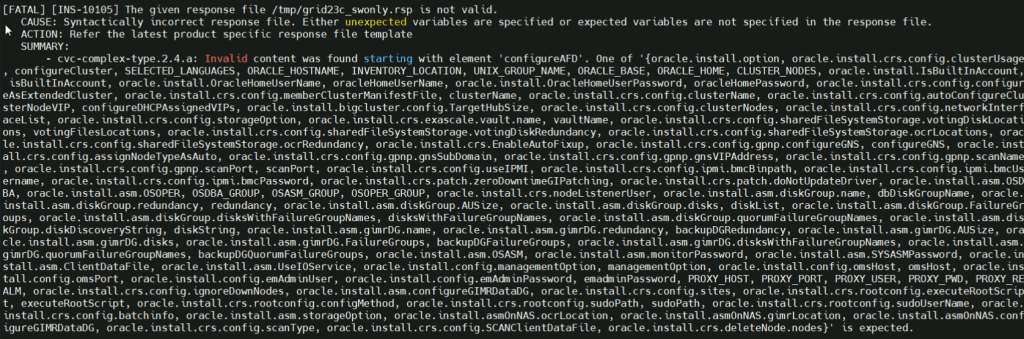
If you do not use ASM Filter Driver (AFD), comment out this parameter in your response file:
# configureAFD=false <--- Comment this line
4. Deploy Oracle Grid Infrastructure (Software Only)
Log in as the grid user and deploy the GI software:
sudo su - grid
/u01/app/23.26.1.0/grid/gridSetup.sh \
  -silent \
  -ignorePrereqFailure \
  -responseFile /tmp/grid23c_swonly.rsp \
  -noCopy
Sample output:
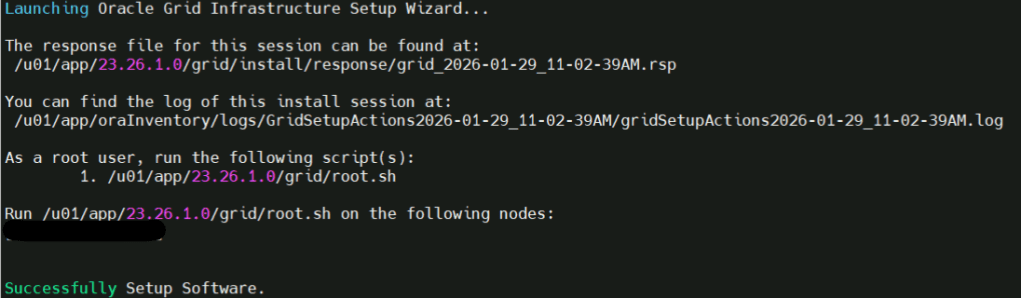
Do NOT run root.sh at this stage.
We will execute it after switching the active GI home.
5. Switch to the Target GI Home
From the target GI home, switch the Grid Infrastructure home one node at a time:
/u01/app/23.26.1.0/grid/gridSetup.sh \
  ORACLE_HOME="/u01/app/23.26.1.0/grid" \
  -silent \
  -switchGridHome \
  -noCopy
Output:
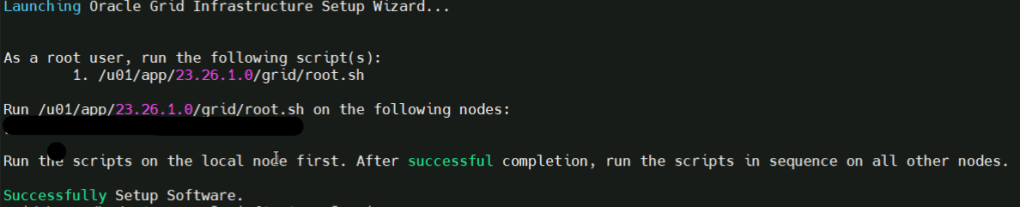
6. Run root.sh
Now log in as root and execute,
/u01/app/23.26.1.0/grid/root.sh
In this step root.sh will update OCR to point new GI home, and active new home as CRS home, so this is why we must not run root.sh too early. The cluster will be restarted and the resources will fail over to other nodes. It needs a small downtime as well .
7. Repeat for Other Nodes
Repeat Steps 4–6 on all remaining cluster nodes (one node at a time).
8. Check Active Clusterware Version
Verify that the new GI home is active:
/u01/app/23.26.1.0/grid/bin/crsctl query crs activeversion -f
Output:
mydb01: Oracle Clusterware active version on the cluster is [23.0.0.0.0]. The cluster upgrade state is [NORMAL]. The cluster active patch level is [2107015493].
mydb02: Oracle Clusterware active version on the cluster is [23.0.0.0.0]. The cluster upgrade state is [NORMAL]. The cluster active patch level is [2107015493].
9. Post check
Execute command
cluvfy stage -post crsinst -n all -verbose
The command validates that the entire cluster is healthy and correctly running from the new GI home after Out-of-Place GI patching.
 Oracle DBA Insights