When a disk fails in an Exadata compute node, it should be replaced as soon as possible. Compute node disks are typically configured with RAID-5, which can tolerate only one disk failure.
⚠️ Important: RAID-5 does not create two copies of your data. It stores only one copy, with parity distributed across the other disks to enable data reconstruction. It’s calculated using XOR of the data on the other disks and rebuild the data.
It might seem unusual that compute nodes, which are critical components, use RAID-5 instead of RAID-1. RAID-1 rebuilds are faster and safer, but RAID-5 saves disk space while still providing single-disk fault tolerance. I don’t really understand the logic behind Oracle using a relatively low-cost solution like RAID-5, given that Exadata costs millions of dollars.
To view the RAID configuration on a compute node:
# /opt/MegaRAID/storcli/storcli64 -LDInfo -Lall -a0
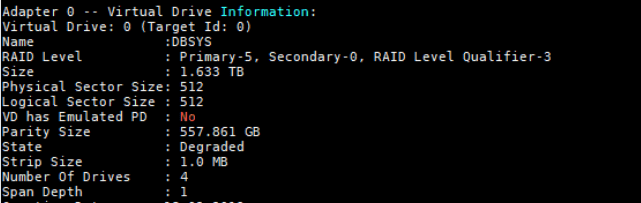
Primary-5 indicates the virtual drive is configured as RAID-5.
Identify the Failed Disk
Disk replacement on a compute node is generally straightforward. You should:
- Identify the failed disk.
- Confirm the slot with an Oracle Field Engineer before physical replacement to avoid mistakes.
#dbmcli -e list physicaldisk
..
252:2 FSTTJZ failed
..
Here, the disk in slot 2 has failed.
To get more information about the failed disk:
# dbmcli -e list physicaldisk 252:2 detail
name: 252:2
deviceId: 1
diskType: HardDisk
enclosureDeviceId: 252
errOtherCount: 0
makeModel: "HGST H101860SFSUN600G"
physicalFirmware: A990
...
physicalSize: 558.9 GB
slotNumber: 2
status: failed
Disk Replacement and Rebuild
After the disk is physically replaced:
- The RAID controller automatically starts rebuilding the new disk using parity.
- Rebuild can take several hours depending on disk size and system load.
You can monitor the rebuild progress:
#dbmcli -e list physicaldisk 252:2 detail
name: 252:2
deviceId: 4
diskType: HardDisk
enclosureDeviceId: 252
errOtherCount: 0
...
physicalSize: 558.91207122802734375G
slotNumber: 2
status: rebuilding
Check Rebuild Rate
To see the rebuild speed:
# /opt/MegaRAID/storcli/storcli64 /c0 show rebuildrate

Check the disk once the rebuild is complete.
# dbmcli -e list physicaldisk 252:2 detail
         name:                   252:2
         deviceId:               4
         diskType:               HardDisk
         enclosureDeviceId:      252
         errOtherCount:          0
         ...
         slotNumber:             2
         status:                 normal
 Oracle DBA Insights