Last time, I built a working enterprise knowledge assistant in Python using RAG + OpenAI + Chroma. It could read documents, answer questions, and even remember chat history.
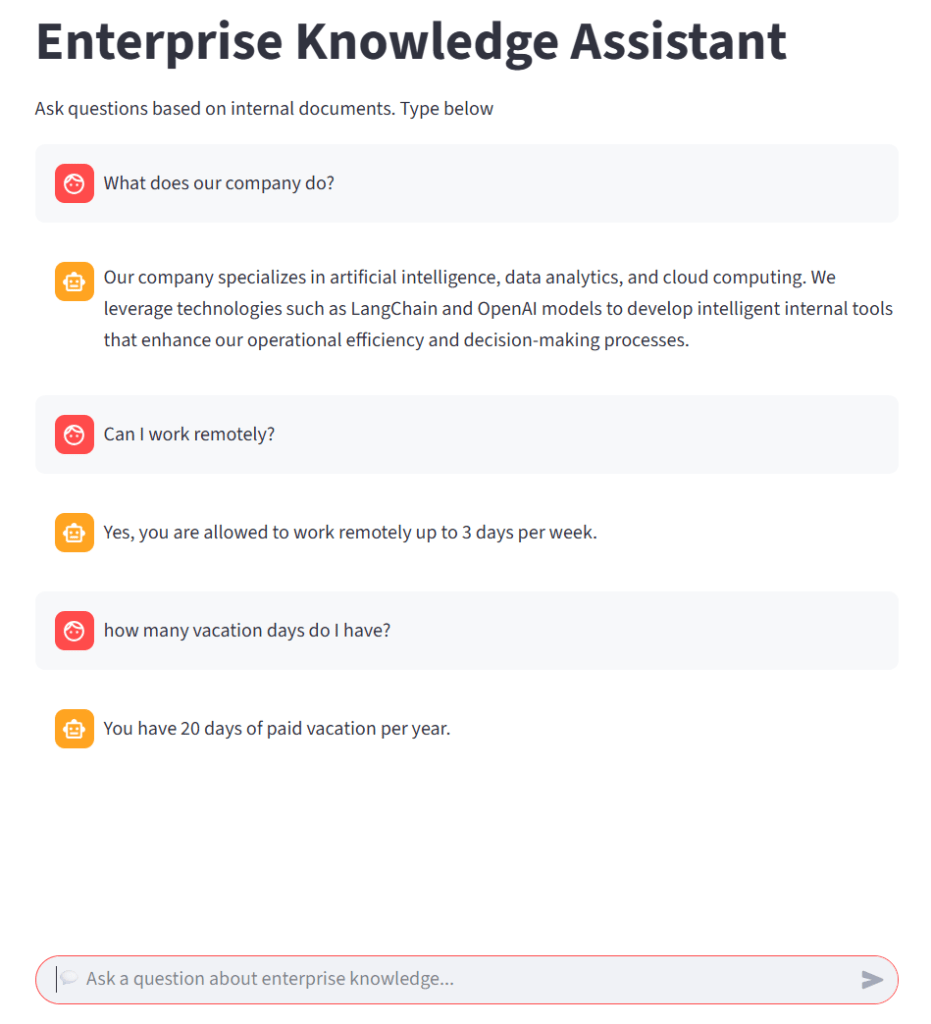
Today, I’m taking it a step further: giving it a friendly web interface. Instead of typing commands in a terminal, employees can now interact with the assistant right in their browser using Streamlit.
What is Streamlit?
Streamlit is an open-source Python framework that lets you turn scripts into interactive web apps quickly and easily.
Install Streamlit
pip install streamlitAdding a Streamlit Interface
Here’s a simple snippet to integrate a chat interface in enterprise_knowledge_assistant.py:
# -------------------------------------
# 4️ Build Streamlit chat interface
# -------------------------------------
if "chat_history" not in st.session_state:
    st.session_state.chat_history = []

user_input = st.chat_input(" Ask a question about enterprise knowledge...")

if user_input:
    wi
th st.spinner("Generating answer..."):
        answer = retrieval_chain.invoke({"question": user_input})
        st.session_state.chat_history.append((user_input, answer))

# Display conversation history
for q, a in st.session_state.chat_history:
    st.chat_message("user").write(q)
    st.chat_message("assistant").write(a)
Running App
> streamlit run enterprise_knowledge_assistant_app.py
You can now access it in your browser:
- Local URL:
http://localhost:8501
Your enterprise assistant is now just a webpage away!
Key Takeaways
Streamlit turns scripts into apps: A Python script becomes a usable tool without frontend work.
Session memory is crucial for multi-turn conversations in a web app.
 Oracle DBA Insights