Many companies have a lot of documents — policies, procedures, meeting notes, and training materials.
The problem: this knowledge is often hard to find.
In this post, I’ll show how to build a simple Enterprise Knowledge Assistant using LangChain, OpenAI, and a vector database (Chroma).
This AI assistant can read your internal files and answer employee questions in natural language.
Business Idea
From a business view, this project is the start of an AI Copilot for your company.
With three key tools —
RAG (Retrieval-Augmented Generation) + OpenAI models + Vector database,
you can turn your static documents into a smart Q&A system.
This saves time, helps teams share knowledge easily, and makes training or onboarding faster.
Tech Stack
- LangChain 1.0.0 – helps connect all AI parts together
- OpenAI GPT-4o-mini – the main chat model (cheap and powerful)
- text-embedding-3-small – creates vector embeddings for text search
- Chroma – stores and searches document vectors
- LangChain Memory – remembers past questions and answers
The Python Code
# enterprise_knowledge_assistant.py
# Build an Enterprise Knowledge Assistant with RAG + Memory

from langchain_openai import OpenAIEmbeddings, ChatOpenAI
from langchain_chroma import Chroma
from langchain_text_splitters import RecursiveCharacterTextSplitter
from langchain_core.prompts import ChatPromptTemplate
from langchain_core.output_parsers import StrOutputParser
from langchain_core.runnables import RunnablePassthrough, RunnableWithMessageHistory
from langchain_community.chat_message_histories import ChatMessageHistory
from langchain_community.document_loaders import DirectoryLoader, TextLoader

#  Load company documents
loader = DirectoryLoader("knowledge_base", glob="**/*.txt", loader_cls=TextLoader)
docs = loader.load()
print(f"Loaded {len(docs)} files.")

#  Split large text into smaller parts
splitter = RecursiveCharacterTextSplitter(chunk_size=500, chunk_overlap=100)
chunks = splitter.split_documents(docs)

#  Create embeddings and vector store
embeddings = OpenAIEmbeddings(model="text-embedding-3-small")
vectorstore = Chroma.from_documents(chunks, embedding=embeddings, persist_directory="chroma_store")
retriever = vectorstore.as_retriever(search_kwargs={"k": 3})

#  Define the chat model and prompt
llm = ChatOpenAI(model="gpt-4o-mini", temperature=0.3)
prompt = ChatPromptTemplate.from_template("""
You are an enterprise assistant.
Use the given context and chat history to answer the question clearly.

<context>
{context}
</context>

<chat_history>
{chat_history}
</chat_history>

Question:
{question}
""")

#  Build the RAG chain
retrieval_chain = (
    {
        "question": RunnablePassthrough(),
        "chat_history": RunnablePassthrough(),
        "context": RunnablePassthrough()
                   | (lambda x: retriever.invoke(x["question"]))
                   | (lambda docs: "\n\n".join(d.page_content for d in docs)),
    }
    | prompt
    | llm
    | StrOutputParser()
)

#  Add chat memory
session_history = ChatMessageHistory()
rag_with_memory = RunnableWithMessageHistory(
    retrieval_chain,
    lambda session_id: session_history,
    input_messages_key="question",
    history_messages_key="chat_history",
)

#  Start the chat
print("\nEnterprise Knowledge Assistant is ready! Type 'exit' to quit.\n")

while True:
    question = input("? Your question: ")
    if question.lower() in ["exit", "quit"]:
        print("Goodbye!")
        break

    answer = rag_with_memory.invoke(
        {"question": question},
        config={"configurable": {"session_id": "enterprise_chat"}}
    )
    print(f"\nAssistant: {answer}\n")
The knowledge documents (company_info.txt and HR_info.txt) were loaded and embedded into the Chroma vector database.
company_info.txt
Our company specializes in AI, data analytics, and cloud computing.
We use LangChain and OpenAI models to build intelligent internal tools.
HR_info.txt
Employees have 20 days of paid vacation per year.
Remote work is allowed up to 3 days per week.
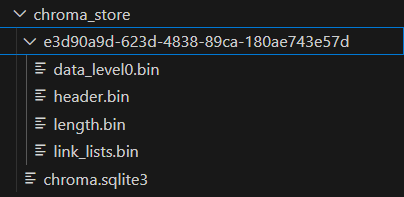
Chroma Vector database stores semantic vectors locally as below:
How It Works
- Load documents from the folder
knowledge_base/ - Split long text into small parts (chunks)
- Turn each chunk into vectors using OpenAI embeddings
- Store them in Chroma for quick similarity search
- When you ask a question:
- The system finds the most relevant text pieces
- GPT reads them and gives a natural-language answer
- The assistant remembers your previous questions during the session
Example
 Enterprise Knowledge Management Assistant Started!
 Type your question (or 'exit' to quit)

? Your question: my name is leon

  Assistant: Hello Leon! How can I assist you today?

? Your question: What does our company do?

  Assistant: Our company specializes in AI, data analytics, and cloud computing. We utilize LangChain and OpenAI models to develop intelligent internal tools.

? Your question: Can I work remotely?

  Assistant: Yes, you can work remotely up to 3 days per week.

? Your question: Good, how many vacation days do I have?

  Assistant: You have 20 days of paid vacation per year.

? Your question: how many vacation days for Leon ?

  Assistant: Leon has 20 days of paid vacation per year.
Business Value
This system can help companies:
- Build an internal AI Copilot using private data
- Save employees’ time finding answers
- Keep knowledge consistent across departments
- Make onboarding and training faster
All this can run safely inside your company network, keeping data private and secure.
 Oracle DBA Insights