Oracle 23AI introduces a groundbreaking feature called True Cache, which provides an in-memory caching layer for frequently accessed data. This significantly improves read performance, especially in environments where quick access to repetitive data queries is critical. However, don’t confuse it with the “In-Memory” feature, as both serve very different use cases. Let’s explore the details.
What is True Cache?
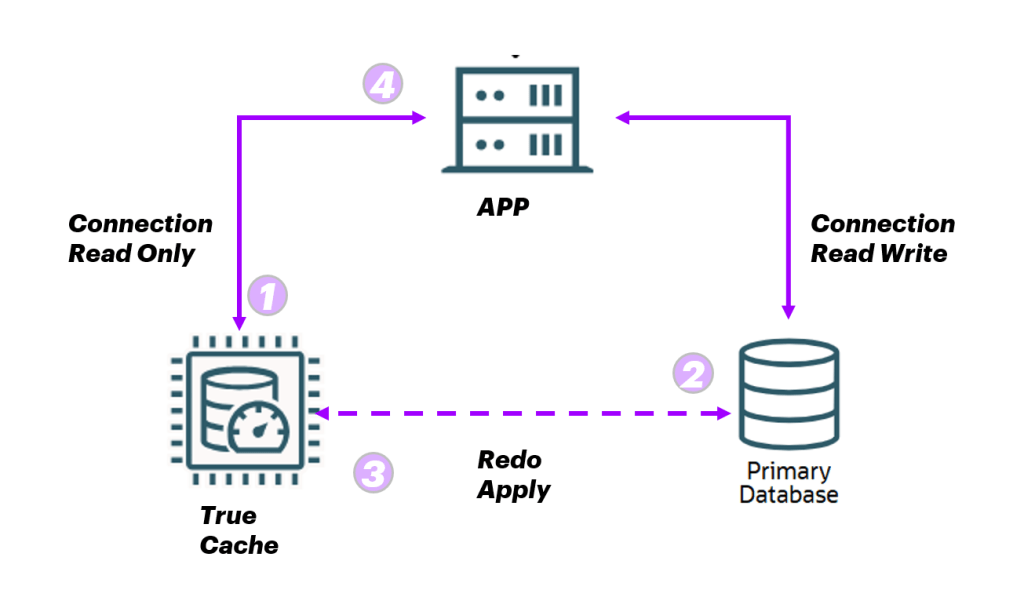
True Cache operates as part of a three-tier architecture:
- Application Server
- Primary Database
- True Cache Instance
In this setup:
The application connects to the Primary Database for read and write operations.
It establishes a read-only connection with the True Cache instance for frequently accessed data.
When the application modifies data in the Primary Database:
- The Primary Database ships Redo Logs to the True Cache instance.
- The True Cache instance applies these logs, ensuring it stays synchronized with the Primary Database.
This architecture allows True Cache to offload read-intensive operations, improving overall performance and reducing load on the Primary Database.
How True Cache Works
Here’s a step-by-step breakdown of how True Cache handles requests:
- App Server Requests Data:
- The application requests data from the True Cache instance.
- Data Check in True Cache:
- If the data is already cached in the True Cache instance, it immediately returns the data to the application.
- If not, the True Cache instance forwards the request to the Primary Database.
- Primary Database Response:
- The Primary Database sends the requested data to the True Cache instance.
- The True Cache instance stores this data in memory for future requests.
- Data Returned to App Server:
- The True Cache instance sends the data back to the application server, completing the request.
Note: True Cache runs as a separate Oracle instance and must be deployed on a server distinct from the Primary Database.
Setting Up True Cache
Creating a True Cache instance is easy. Use the following command to configure it:
./dbca -silent -createTrueCache \
  -gdbName TRUECACHEDB1 \
  -sourceDBConnectionString Primary_server_IP:1521/PrimaryDB \
  -passwordFileFromSourceDB $ORACLE_HOME/dbs/orapwTRUECACHEDB1
Comparing True Cache and In-Memory Features
While both True Cache and Oracle’s In-Memory feature aim to enhance read performance, their use cases and implementations differ significantly:
Oracle In-Memory
- Designed primarily for OLAP .
- Stores data in a columnar format, optimized for analytical queries.
- Data is compressed and stored in memory.
- Requires DBAs or applications to decide which data to load into memory.
True Cache
- Supports both OLTP and OLAP workloads.
- Dynamically caches all data that passes through the True Cache instance, without requiring manual selection.
- Ideal for environments with a mix of read-heavy workloads and dynamic query patterns.
 Oracle DBA Insights