Flash cache plays a critical role in Exadata performance. When issues arise, it’s crucial to understand the symptoms and resolution steps. Typically, each flash cache comprises four flash disks. If one flash disk fails, the cell service automatically removes it while continuing to operate with the remaining three disks. In most cases, immediate intervention is not necessary.
Example of Degraded Flash Cache:
name:                   exa41cel05_m_FLASHCACHE
cellDisk:               FD_00_exa41cel05_m,FD_01_exa41cel05_m,FD_03_exa41cel05_m
creationTime:           2018-03-22T18:39:24+01:00
degradedCelldisks:      FD_02_exa41cel05_m
effectiveCacheSize:     17.4651947021484375T
id:                     7d4cba6c-33d5-4aca-be20-ff5041cc5974
size:                   23.28692626953125T
status:                 warning - degraded
However, degraded flash cache can affect database I/O performance, especially during periods of high I/O activity when more cache is needed. This performance impact may be evident in AWR reports under the ‘Exadata OS IO Statistics – Outlier Cells’ section. In the case study below, degraded flash cache was observed across four different cell storage units, highlighting the potential scope of the issue.
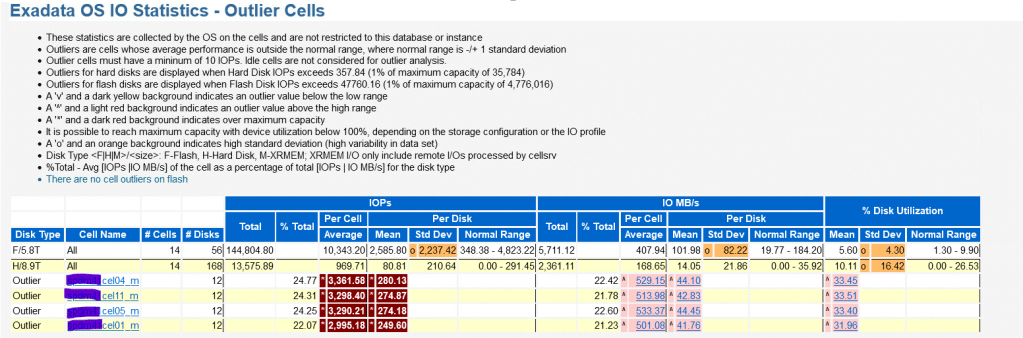
To diagnose the issue, examine the Exadata Cell Performance metrics. Look for two key indicators: first, the ‘Average Read IO per second’ dropping to 0 in Flash Cache (See the diagram below, focusing on position 1). And second, an increase in the ‘Average Read Throughput Redirected to Disk’ metric (See diagram , from position 1 to position 2).

Resolution
First, verify the physical disk status using CellCLI. If any physical disks show a failure status, contact Oracle support immediately and arrange for a quick replacement.
However, if all physical disks report a normal status, it suggests that the flash cache degradation is likely caused by a software issue (possibly a bug). In this case, recreating the flash cache is often an effective approach to resolve the problem. Even in scenarios where there is a physical disk failure, recreating the flash cache while excluding the failed flash disk can be a viable solution.
CellCLI> LIST PHYSICALDISK where disktype='FlashDisk'
     FLASH_10_1      PHLE7384009N6P4BGN-1    normal
     FLASH_10_2      PHLE7384009N6P4BGN-2    normal
     FLASH_4_1       PHLE738400MR6P4BGN-1    normal
     FLASH_4_2       PHLE738400MR6P4BGN-2    normal
     FLASH_5_1       PHLE738400GH6P4BGN-1    normal
     FLASH_5_2       PHLE738400GH6P4BGN-2    normal
     FLASH_6_1       PHLE738400PR6P4BGN-1    normal
     FLASH_6_2       PHLE738400PR6P4BGN-2    normal
CellCLI> alter flashcache all flush
CellCLI> drop flashcache
CellCLI> drop celldisk all flashdisk
CellCLI> create flashcache allAfter recreating the flash cache, monitor the performance metrics in Exadata. Pay particular attention to the ‘Average Read Throughput Redirected to Disk’ metric, which should show a reduction, indicating improved flash cache performance (See the diagram above, focusing on position 2).
Important Note:
Oracle recommends switchover the database if it has standby side before recreating flash cache. Consult Oracle Support for guidance and checking Flash cache In Degraded Mode (Doc ID 2366991.1).
 Oracle DBA Insights